Free WordPress Template for US and UK Roofers
Free Roofing Website Template for WordPress (Elementor)
A proven, ready-made roofing company website template for WordPress and Elementor, validated on real roofing campaigns to turn cold leads into form fills and calls. No cost, no card. Enter your name and email, download the template, and follow the install steps below.
Get the free template
Free download. No card. Unsubscribe anytime.
What it looks like
Preview the roofing company website template
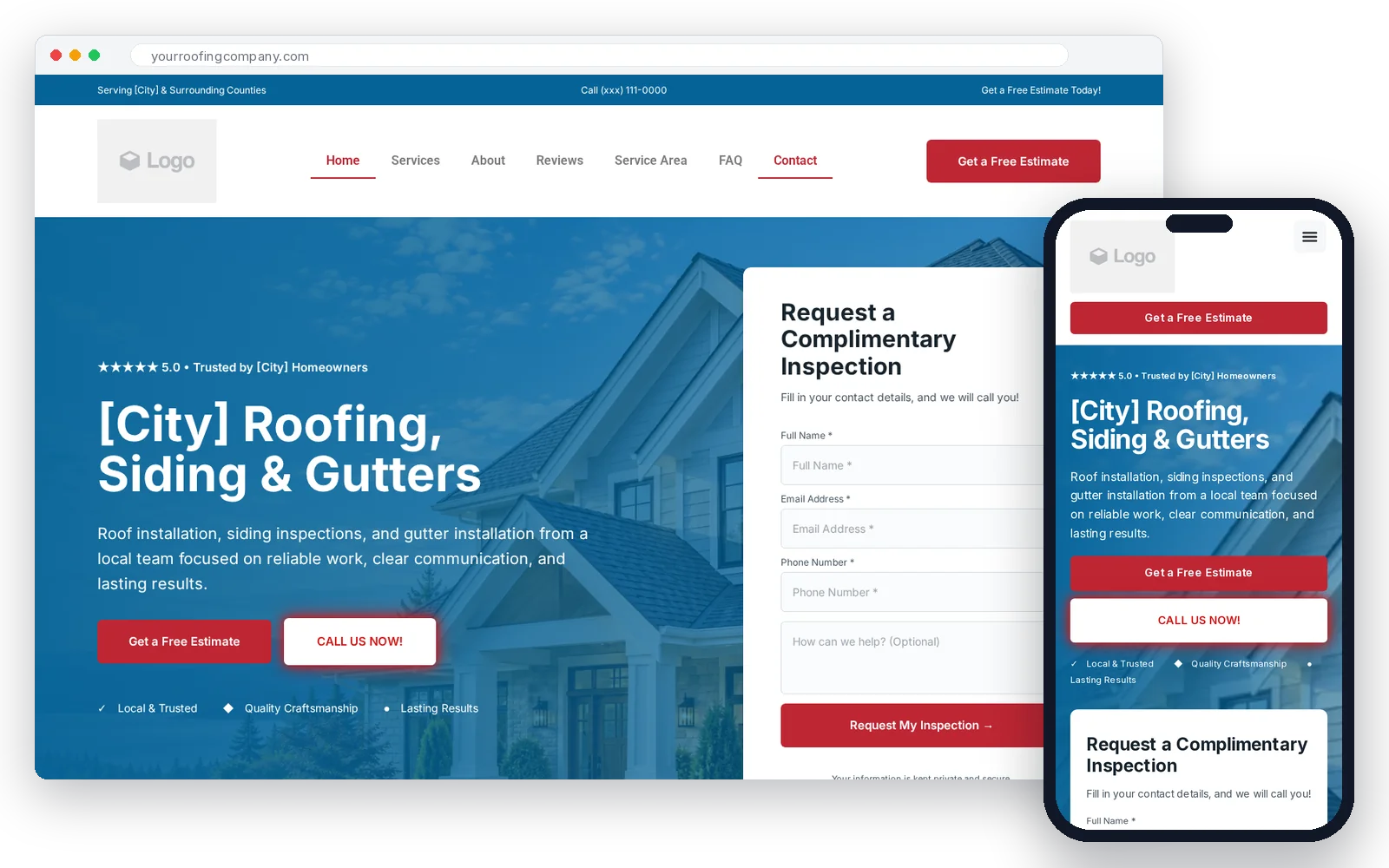
This is a complete single-page roofing site that works on desktop, tablet and mobile. The layout is validated: it's built to turn cold traffic into form fills and phone calls. Every section is customizable in Elementor's drag-and-drop editor.
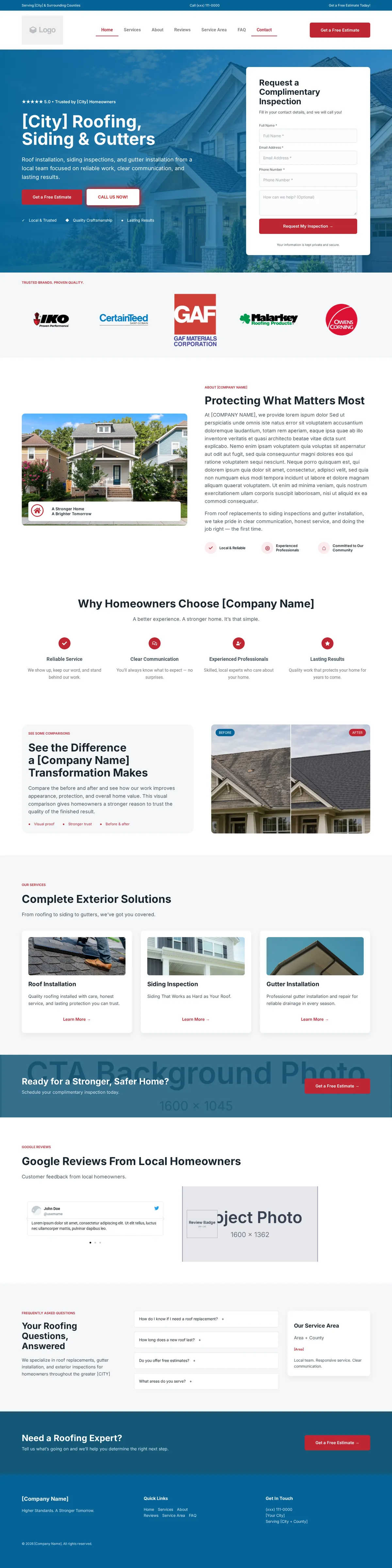
See the full desktop page, top to bottom
Scroll inside the frame to see every section of the template, from header to footer.
What you get
What's included in the template
Logo, navigation and mobile hamburger menu
Clear headline, subheadline and form to capture leads
Years in business, projects completed, satisfaction stats
Roof installation, siding, gutters with expandable detail popups
Owner introduction and business story
Project showcase with side-by-side images
Customer testimonials with star ratings
Common roofing brands (GAF, Owens Corning, CertainTeed, IKO, Malarkey, TAMKO) you can keep or swap
Cities and regions you cover
Common roofing questions and answers
Call-to-action for quotes and contact
Contact info, links and copyright
Everything is customizable. Replace the placeholders [Company Name], [City], phone numbers and sample images with your own business details and project photos.
Fully responsive. The template adapts to desktop, tablet and mobile automatically.
Before you start
What you need before you install it
Your website address (e.g. mikesroofing.com). Typically $10–20 per year from any domain registrar.
Any hosting provider with one-click WordPress installation. Most hosting companies offer WordPress-specific plans.
Installed via your hosting control panel (usually a one-click install button).
The free Elementor plugin from wordpress.org/plugins/elementor.
A free community plugin that unlocks Elementor Pro widgets (forms, menus, etc.) without buying Pro. Download from proelements.org.
Pro Elements is a community project, not made by Elementor. Use the latest version of Elementor alongside it.
Step by step
How to install the template, step by step
Buy a domain and hosting
Register your roofing company domain and choose a WordPress hosting plan. Most hosting providers let you do both together.
Install WordPress
Use the one-click WordPress installer in your hosting control panel (cPanel, Plesk, or your host's custom dashboard).
Install and activate Elementor
Log into WordPress, go to Plugins → Add New, search for "Elementor", and click Install Now then Activate.
Install Pro Elements
Download the Pro Elements plugin zip from proelements.org. In WordPress, go to Plugins → Add New → Upload Plugin, choose the .zip file, and click Install Now then Activate.
Unzip my download
Extract the .zip file you downloaded from this page. Inside you'll find a free-roofing-website-template.json file.
Import the template
In WordPress, go to Templates → Saved Templates → Import Templates. Click the upload area, select the .json file, and import it.
Create a new page and insert the template
Go to Pages → Add New. Click Edit with Elementor. In the Elementor editor, click the folder icon, go to My Templates, find the imported template, and click Insert.
Set the page layout and make it your homepage
In the Elementor editor, click the gear icon (Page Settings), go to Page Layout, and choose Elementor Full Width or Elementor Canvas. Publish the page. Then go to Settings → Reading in WordPress and set this page as your homepage.
Replace placeholders and sample images
Edit the page with Elementor. Replace every [Company Name], [City], phone number, and sample image with your actual business name, service areas, contact details, logo, and real project photos. Update the menu widgets to use your WordPress menus, and set the form's email address in Actions After Submit → Email.
Publish and test the form
Click Publish or Update. Visit your live site and submit a test form to confirm the email arrives correctly.
The honest truth
A website alone won't get you roofing leads
Having a nice-looking website is a start, but it won't generate leads on its own. Homeowners need to find it first — and that means ranking in Google.
Paid ads
- Ads stop the moment you stop paying
- Every click costs money, every month
- You're renting visibility from Google
- Works best once you're already ranking
SEO
- Once set up properly, calls and quote requests from organic search don't cost you per click
- Keeps working for you month after month
- It's an asset, not rent
- This is what you build first
While you're not ranking yet, SEO is the first thing to get done.
Ads come later: once you're already ranking, ads are a way to compete harder against the other roofers who are also ranking — not a replacement for ranking. If you're budgeting for marketing, see what a realistic marketing budget looks like with my free roofing marketing budget calculator.
To rank, you need:
- Google Business Profile — so you show up in local map results.
- Local SEO and service-area pages — to rank for "roofer near me" and "[city] roofing contractor" searches.
- Google reviews — homeowners compare roofers by star ratings and review volume.
- Fast page speed — a slow site loses visitors before they ever call.
- Phone call and form tracking — so you know which traffic sources produce real enquiries.
- Fast follow-up — homeowners often go with the roofer who gets back to them first.
That's the part I manage for roofing companies: organic SEO first, then paid ads once you're ranking, plus the CRM, follow-up and sales automation that turn those opportunities into booked inspections and sold jobs.
Book a free discovery call →Done-for-you option
Want me to set it up for you? ($250)
I'll install the template on your hosting and add your details, so you don't have to work through the Elementor steps yourself.
What's included
- ✓Install the template on your hosting
- ✓Add your business name, logo, services, photos, phone number and city
- ✓Set up the quote form email
- ✓Configure the menus
- ✓Basic on-page SEO
- ✓Mobile check
How it works
- 1Send the form
- 2I reach out to talk it through
No payment before that.
- 3I set it up
Hosting and domain not included
You provide hosting and domain access, or I'll guide you through getting them.
FAQ
Frequently asked questions
Is the roofing website template really free?
Yes. Enter your first name and email and the download unlocks right away. No cost, no card.
Do I need Elementor Pro?
No. It's built to work with free Elementor plus the free Pro Elements plugin. You'll also need a domain, WordPress hosting and a WordPress install.
Can you install it for me?
Yes. My done-for-you setup is $250: I install the template on your hosting and add your business name, logo, services, photos and contact details. Hosting and domain costs are separate.
Will a template get me roofing leads?
Not on its own. Ranking in Google is what brings in leads without paying per click, and that's what needs to happen first. Ads make more sense once you're ranking. Local SEO is included from my Growth plan up, starting at $2,500/month.
Can I edit the template?
Yes. Every section can be edited in Elementor's drag-and-drop editor.
Ready to build a roofing marketing system that actually works?
A free template gives you a starting point. But a roofing website that ranks in Google, generates qualified leads, and converts those opportunities into jobs takes more than a nice design.
I help US and UK roofing companies build the whole system: local SEO, paid ads, landing pages, tracking, CRM, follow-up automation and reactivation. Want to learn how to get more roofing leads? Start there, then book a call.
Book a free discovery call →Or see my roofing marketing plans and how I manage roofing lead generation.